7 Canva Digital Invitations for Better Dinner Parties
 16 min read
Custom Canva digital invitations tell your friends exactly what to expect before they even step through your front door. Gathering four to twelve people for a home dinner party requires clear communication and a warm tone. You want your friends to feel welcomed instantly.
Sending a beautifully designed digital invite sets the stage for a wonderful evening.
This guide covers how to design, send, and manage your invitations for a smooth event. You will learn to use RSVPs for menu planning and accurate drink calculations. Setting up your digital invites properly keeps your focus entirely on the food and the company.
At a Glance
- Customizing your digital template sets clear expectations for the formality of your upcoming dinner party.
- Sending invitations three to four weeks early gives guests ample time to clear their schedules.
- Including precise details about menus and interactive meal formats prevents arrival day confusion.
- Using prompt RSVP replies helps you accurately calculate wine, ice, and appetizer quantities.
What Canva Digital Invitations Mean for Modern Hosts
Using Canva digital invitations means utilizing a digital design platform to create personalized event notices for your home gatherings. This method replaces standard text messages with a cohesive digital card that you text or email directly to your friends. For a modern host organizing an intimate dinner for four to twelve guests, these templates offer complete control over fonts, colors, and layout. They act as the very first point of contact for your dinner party.
These digital designs are distinctly different from generic calendar invites. A calendar invite simply blocks out time. A customized digital template communicates the exact vibe of your gathering.
When your guests receive a carefully crafted design on their phones, they immediately understand whether they are attending a formal sit-down meal or a casual pizza night. This works because visual cues like typography and color palettes carry specific cultural meanings. This clarity helps your friends know how to dress, what to bring, and how to prepare for the evening ahead.
How Do You Design Canva Digital Invitations for a Dinner Party?
Designing Canva digital invitations requires matching your template to the gathering’s vibe. For a casual pizza night or an elegant dinner for eight, customize fonts and colors to set clear guest expectations from the moment they open the invite on their phones. Proper design choices establish the right mood immediately.
For the visual starting point, read Why You Should Use Custom Dinner Party Invitations.
The Emily Post Institute recommends matching the invitation method and language to an event’s level of formality to clearly set guest expectations. Your chosen typography plays a massive role in this communication. A flowing script font suggests a formal evening with multiple courses and perhaps a specific dress code.
A bold block letter design signals a relaxed weekend afternoon where guests can wear comfortable clothes and expect hearty comfort food.
Color palettes also provide subtle clues about your dinner party. Earth tones like deep green and terracotta work wonderfully for a rustic autumn stew night. Bright yellows and crisp whites perfectly suit a summer brunch or a lively patio gathering.
Adjusting the primary colors of your digital template to match your planned table setting creates a cohesive aesthetic experience.
Finding the right template provides a solid foundation for your creativity. Reviewing 7 Tips for Birthday Digital Invitations That Wow Guests offers great examples of how layout affects readability. Ensure your text contrasts sharply against the background color.
Dark text on a light background remains the easiest combination to read on small mobile screens.
The difference between a confusing invite and an effective one is visual hierarchy. Make the date and time the largest text on the screen. Place your location and RSVP details in a smaller, highly legible sans-serif font right below the main event title.
Select a digital template and adjust the primary colors to match your planned table setting or seasonal decor.
|
Pair the Design With the Details |
When Should You Send Canva Digital Invitations to Guests?
Send your Canva digital invitations about three to four weeks before a standard home dinner party. This window gives your four to twelve guests enough time to clear their schedules and reply, but isn’t so far out that they forget the date. Timing your invitations correctly ensures maximum attendance.
Set a clear response plan using RSVP Etiquette: 8 Host Rules for Replies and No-Shows.
The Emily Post Institute notes that digital invitations are practical, thrifty, and green, making them ideal for quickly arranged events and pre-wedding parties such as showers or bachelorette parties.
This practicality directly applies to home dinner parties. Because you bypass the postal service, your guests receive the details instantly.
This immediate delivery allows you to finalize your headcount much faster than traditional paper methods.
For intimate gatherings of four people, a three-week notice works perfectly. Small groups usually coordinate their schedules easily.
When expanding your guest list to twelve people, lean toward the four-week mark. Coordinating larger groups requires more calendar flexibility from everyone involved.
If you plan to host during a particularly busy season, consider giving your friends a heads-up even earlier. Sending 5 Save Date Online Invitations Tips for Easy Hosting ensures your event stays on their radar. A save-the-date text lets your friends block the evening out before you finalize the exact menu or design the official digital card.
Once you send the official invitations, monitor the responses closely. Prompt replies allow you to begin finalizing your grocery lists and prep schedules. Never hesitate to send a polite follow-up message if a week passes without a response.
Set a calendar reminder to text or email your digital invites exactly 21 to 28 days before you plan to host the dinner.
What Details Must Be Included on Your Digital Party Invite?
Your invitation must clearly state the date, start time, location, RSVP deadline, and whether guests should bring anything. If you are serving a themed interactive meal or splitting costs for a collaborative group dinner, mention it directly on the Canva digital invitations. Clear details prevent any arrival day confusion.
Ask about guest needs with How to Ask Guests About Dietary Restrictions: Scripts.
Providing an exact start time helps your friends plan their transportation. You should also clarify if the start time indicates when drinks begin or when the actual meal hits the table. A simple line stating “Cocktails at six, dinner at seven” eliminates any guessing.
Guests appreciate knowing exactly when they need to arrive.
Just One Cookbook recommends building themed hosting menus around interactive formats like DIY sushi bars or gyoza-wrapping stations to ease host preparation.
If you choose an interactive format, tell your guests on the invite. Knowing they will roll their own sushi or press their own tortillas builds excitement. It also prepares them for a hands-on culinary evening rather than a formal served dinner.
Do not forget to include logistical details about your home.
If your neighborhood requires a gate code, type it directly into the invitation details. Mentioning limited parking situations or requesting that guests park on a specific side of the street keeps you on good terms with your neighbors.
Including dietary request prompts on your invitation is essential for modern hosting. Reviewing Paperless Post Alternative: Invitations Built Into Your Party Plan shows that asking for allergies upfront simplifies your menu planning. You never want to discover a peanut allergy after you have already prepared a Thai peanut sauce.
Include a short polite note on the invitation asking guests to flag any new dietary restrictions when they submit their RSVP.
How Can Digital Invitations Help Plan Your Party Drink Menu?
Including drink details on your Canva digital invitations allows guests to prepare for toasts or arrange a designated driver. Ask guests for their beverage preferences in the RSVP so you can accurately stock your home bar with wine, champagne, or non-alcoholic options. Knowing what your friends prefer removes the guesswork from grocery shopping.
Share the preparation using Co-Hosting and Progressive Dinner Party Planning.
Wine Folly recommends calculating party wine requirements by dividing the total number of guests by 2.15 to determine how many standard 750ml bottles to buy.
When your digital RSVPs arrive, tally up the wine drinkers and apply this formula. If you expect ten wine-drinking guests, dividing by 2.15 suggests you need about five bottles.
This mathematical approach prevents overspending at the liquor store.
If your dinner party includes a special celebration, you might want to serve a formal toast. Wine Folly recommends buying one bottle of sparkling wine for every five guests when hosting a large event toast. Include a small note on your digital invite about the planned toast so guests know what to expect.
Do not forget the basic necessities for your drink station. Taste of Home recommends providing 5 pounds of ice for every 5 guests when stocking party beverages. You will need plenty of freezer space or a dedicated cooler to hold this much ice.
Adding a question about non-alcoholic preferences to your invitations ensures you buy enough sparkling water for everyone.
Reading through 7 Digital Invitations for Wedding Events Made Easy offers great examples of how to phrase these beverage questions politely. A simple checkbox on a digital reply form gathers all the data you need to set up a welcoming home bar.
Tally the wine drinkers from your RSVPs and use the 2.15 division rule to finalize your grocery shopping list.
|
Hosting Tip: test the reply route. |
How Do You Coordinate Holiday Gatherings with Digital Invites?
Holiday gatherings demand early planning and clear communication. Using Canva digital invitations for festive events allows you to track larger guest lists and coordinate who is bringing which treats without getting lost in endless confusing group text message chains. Digital templates streamline the seasonal chaos into one organized hub.
Compare invitation platforms with The Gourmet Host vs Partiful vs Evite: Party Invites Compared.
Festive events often involve collaborative food sharing. King Arthur Baking notes that the tradition of hosting holiday cookie swaps has deep historical roots across Germany, Scandinavia, Hungary, Austria, and Eastern Europe.
If you plan to honor this tradition, your invitation needs a system for tracking contributions. You want to avoid a situation where five friends all bring chocolate chip cookies and no one brings sugar cookies.
Use the description section of your digital invite to outline the rules of the gathering. Specify how many cookies or portions each person should bring. Explicit instructions prevent guests from feeling anxious about bringing the wrong item.
If the holiday meal involves a potluck format, ask guests to reply with their intended dish.
This transparency guarantees a balanced table featuring appetizers, main courses, and desserts. You can easily update the digital event page as friends claim different courses.
Checking out 7 Digital Graduation Invitations Tips for Home Hosts reveals how to manage large seasonal crowds effectively. A well-designed holiday invite clearly states the festive theme while organizing the logistical details behind the scenes. Your friends will appreciate knowing exactly what the night entails.
Add an interactive link to your holiday invitation where guests can sign up for specific dinner courses or dessert varieties.
How Do You Manage Menu Planning After Guests RSVP?
Once RSVPs roll in from your Canva digital invitations, finalize your food quantities based on the exact headcount. A dinner for twelve requires significantly more prep and oven space than an intimate gathering of four, so lock down your recipes and portions early. Accurate headcounts form the foundation of a successful meal.
Appetizers set the tone for the entire evening. Taste of Home recommends preparing six appetizers per guest for standard dinner gatherings, or double that amount for cocktail-style events.
If your RSVPs confirm eight attendees for a seated dinner, you need forty-eight appetizer pieces. Calculating these numbers early allows you to choose recipes that scale well without requiring constant active cooking.
For the main course, consider dishes that perform well for crowds. King Arthur Baking recommends making pan pizzas such as Detroit-style or Grandma pies for hosting crowds because dough can be prepped in advance without last-minute shaping. Preparing pan pizzas means you spend time visiting with your friends instead of stretching dough while everyone watches.
Reviewing your final guest list also dictates your oven schedule. If your appetizers and your main course both require a 400-degree oven, you must coordinate the timing precisely. Write out a cooking schedule based on the final guest count provided by your digital invitations.
| Guest Roster | Pre-Dinner Bites | Beverage Requirements | Make-Ahead Strategy |
|---|---|---|---|
| Intimate Dinner (4) | 24 stuffed mushrooms | 2 standard red wine bottles | Chop vegetables 24 hours prior |
| Medium Group (8) | 48 bruschetta slices | 4 standard white wine bottles | Marinate proteins two days early |
| Large Gathering (12) | 72 mini quiches | 6 standard mixed wine bottles | Bake dessert crusts 48 hours ahead |
| Neighborhood Block (16) | 96 savory tartlets | 8 standard mixed wine bottles | Order specialty meats a week out |
Rely on your RSVP data to map out refrigerator space as well. Large gatherings mean extra beverage bottles and bulky ingredient containers. Clear out your fridge two days before the party based on the quantities your digital responses require.
Review your final guest count and scale your appetizer recipes to ensure you have exactly six pieces per person.
How Do You Track RSVPs and Follow Up on Canva Digital Invitations?
Tracking RSVPs systematically ensures you know exactly who is attending your dinner party. Use a Canva form or linked RSVP page alongside your Canva digital invitations to monitor replies in one place. Following up politely with friends who have not responded keeps your planning schedule on track.
Set a firm RSVP deadline on the invitation. Usually, asking for replies one week before the event provides enough time for final grocery shopping.
When the deadline passes, you must contact anyone who has not replied. A simple, friendly text asking if they plan to join you resolves any lingering uncertainties.
Managing the responses effectively requires deep organization. Exploring Best Apps to Send Invitations and Track Your RSVPs shows how centralizing your guest list prevents miscommunication. When guests text you outside of the digital invitation platform, manually update your master list immediately so you do not forget their response.
A complete and accurate guest list dictates everything from table settings to the number of chairs you need to pull from other rooms. Knowing the exact headcount allows you to arrange your dining space comfortably. You want every person to have ample elbow room and easy access to their drinks.
Handle unexpected plus-ones gracefully by padding your final grocery list by ten percent. If a guest asks to bring a partner at the last minute, your accurate tracking system lets you quickly assess if you have the physical space and the food portions to accommodate them.
Create a master checklist on your phone to consolidate RSVP responses, dietary needs, and assigned dishes in one centralized location.
|
Share the Preparation |
How The Gourmet Host Helps You Apply Canva Digital Invitations
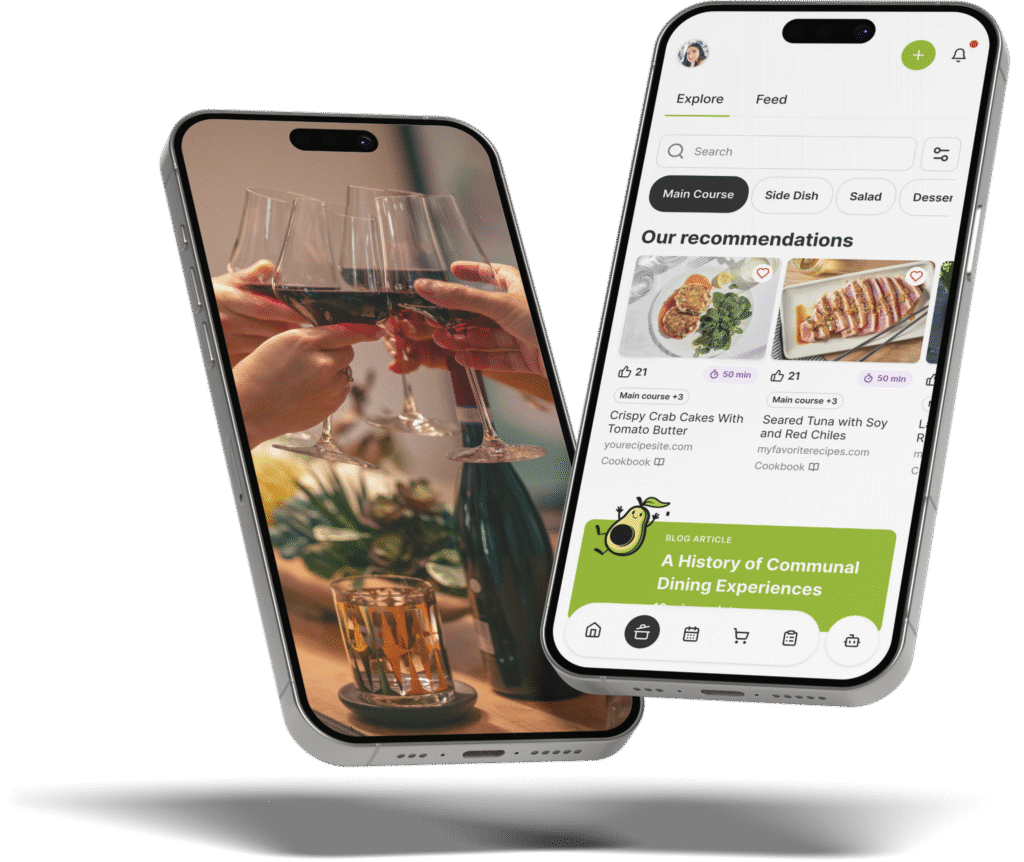
The Gourmet Host mobile app pairs your beautiful Canva digital invitations with a fully interactive event page, upgrading the entire planning process for modern home hosts.
Instead of just sending a static image into a group text and hoping for responses, you can create a dedicated event hub. Add your chosen theme and build your menu for all guests to see, building anticipation before they even walk through your door. Guest dietary notes stay with the plan.
When your four to twelve guests reply to your digital invites, The Gourmet Host takes over the heavy lifting. Guest dietary notes stay with your event details, and you can review ingredients and choose suitable recipe replacements before you cook. It handles the details recipe sites leave out, ensuring every guest feels included at your table.
You gain confidence by checking your menu and ingredient labels with the guests concerned.
Because the future of dinner parties is collaborative, The Gourmet Host makes it simple to transition from the invitation stage to shared execution. If your Canva digital invitations mention a collaborative dinner, the app allows you to easily invite co-hosts, assign specific dishes, and split costs. Our cost-splitter simplifies post-party logistics, letting you focus on the toasts, party games, and enjoying the gathering with your friends.
You can start with over 500 recipes from professional test kitchens. You can also search for recipes across the web and jump straight to the original source without ever leaving the platform. Shared recipe and task lists make it easy to organize your preparation so you focus on what you do best.
Share your final invitation design alongside your The Gourmet Host event link to track RSVPs, dietary notes, and shared costs in one place.
Frequently Asked Questions
Are Canva digital invitations free to make?
Yes, many design platforms offer free templates for Canva digital invitations. You can customize the text, colors, and layout without paying any fees. Premium templates or specific custom fonts might require a paid subscription, but the basic tools provide everything required to create beautiful event notices for home gatherings.
How do you track RSVPs from digital invitations?
You can track RSVPs by using specialized event management platforms or by manually recording text message replies in a dedicated spreadsheet. Including a firm response deadline on your Canva digital invitations encourages prompt replies. Centralizing your guest list helps you accurately calculate grocery quantities and finalize your seating arrangements.
Can you text a Canva digital invitation?
Yes, you can easily text a Canva digital invitation to your friends. Simply download the finished design as an image file to your smartphone and attach it to a text message. Texting provides immediate delivery and often yields faster RSVP responses compared to traditional email event notifications.
What is the best way to handle dietary restrictions on invites?
The best approach involves adding a specific request for dietary information directly on your Canva digital invitations. Politely ask your guests to list any allergies or food preferences when they confirm their attendance. Gathering this information early allows you to modify recipes and ensure a safe menu for everyone.
How do you split dinner party costs on a digital invite?
Mention your collaborative approach clearly on the invitation so guests understand the financial expectations before accepting. You can state an estimated contribution amount directly in the design. Following up with a dedicated expense-sharing platform after the dinner party ensures exact calculations and transparent reimbursements for all grocery purchases.
Can a downloaded invitation image collect RSVPs?
A downloaded image does not collect responses by itself. Include a clear reply instruction and an event link, or share a live Canva design with a form. Test the reply route on a phone before sending the invitation, then keep all responses in one place for your final headcount.
Continue Reading:
More On Digital Invitations and RSVPs
- 7 Digital Invitations for Wedding Events Made Easy
- 7 Tips for Birthday Digital Invitations That Wow Guests
- 7 Digital Invitations Birthday Tips for Easy Hosting
- 5 Save Date Online Invitations Tips for Easy Hosting
- 7 Digital Graduation Invitations Tips for Home Hosts
More from The Gourmet Host
- Why You Should Use Custom Dinner Party Invitations
- RSVP Etiquette: 8 Host Rules for Replies and No-Shows
- How to Ask Guests About Dietary Restrictions: Scripts
- Co-Hosting and Progressive Dinner Party Planning
- The Gourmet Host vs Partiful vs Evite: Party Invites Compared
Explore TGH Categories