7 Digital Invitations for Wedding Events Made Easy
 12 min read
Sending digital invitations for wedding gatherings helps you organize intimate celebrations directly from your phone. You will learn how to structure your event page to handle RSVPs, track dietary restrictions, and link your registry without cluttering the design.
This guide provides exact timelines and practical steps for managing everything from a small rehearsal dinner to a micro wedding right at your own dining table.
At a Glance
- Digital invitations are entirely appropriate for intimate wedding events hosted at home.
- Expect a standard decline rate of 10 to 20 percent even for small gatherings.
- Online platforms provide a dedicated section for registry links that guests can view instantly.
- You can poll guests about beverage preferences before stocking your home bar.
- Tracking dietary restrictions early allows you to bake allergy friendly cakes days in advance.
What “digital invitations for wedding” means for the modern home host
Using digital invitations for wedding events involves creating an interactive online page to organize intimate celebrations like showers, rehearsal dinners, and small receptions at your home. This process moves beyond simply emailing a static graphic. It means setting up a central hub where guests can RSVP, view the menu, list their dietary restrictions, and access registry information in one place.
You apply this method when hosting 4 to 12 people around your dining table. The difference between standard paper invites and digital options lies in immediate communication and organization.
While traditional mail requires guests to manually return a card, digital versions instantly update your guest list. This gives you exact headcounts for grocery shopping and meal preparation well before you start cooking.
Are digital invitations for wedding showers and parties acceptable etiquette?
Yes, digital invitations are entirely appropriate for intimate wedding events hosted at home. Modern etiquette embraces paperless options for pre wedding celebrations. This allows home hosts to easily coordinate dates, track guest responses, and manage event details in one convenient and accessible digital space.
Map out the gathering using Bridal Shower Planning: Venues, Timing, Hosting.
The Emily Post Institute notes that digital invitations are practical and acceptable for wedding showers, bachelor or bachelorette parties, and short notice weddings where paper invites cannot be printed in time.
Guests appreciate the immediate access to details like parking instructions or gate codes. You can use these tools to communicate directly with your inner circle. This setup prevents lost mail and delayed responses from complicating your dinner preparations.
Designing a clear digital card sets the expectations for your menu and seating format right away. A formal sit down dinner requires a very different visual aesthetic than a casual backyard toast.
Choose a digital design that clearly matches the formality of your at home dinner party or wedding shower. If you need specific layout inspiration, reviewing Paperless Post Alternative: Invitations Built Into Your Party Plan can help you select the exact right visual tone for your gathering.
|
Keep the Welcome Organized |
What percentage of guests will decline a digital wedding invitation?
When you send digital invitations for wedding events, you should expect a standard decline rate based on prior commitments. Even for intimate home gatherings of 10 to 12 people, it is completely normal for a small fraction of your guest list to be unable to attend.
Build the meal around the event with Bridal Shower Brunch: Menu, Timing, Drinks, Setup.
The Emily Post Institute reports that typically 10 to 20 percent of invited wedding guests send regrets due to prior commitments or unforeseen circumstances.
This ratio holds true regardless of whether you mail physical cards or send digital links. Managing a smaller guest list at home means that one or two declined invitations will noticeably shift your headcount. You should plan your recipe portions and seating arrangements with this standard drop off in mind.
Knowing your final guest count early keeps your grocery bill strictly aligned with actual attendance. Preparing a lavish multi course dinner for ten guests is much easier when you confirm precisely ten people are arriving.
Invite one or two extra guests to account for standard regrets without exceeding your home dining table’s capacity. Doing this ensures your gathering feels full and lively. Utilizing 7 Canva Digital Invitations for Better Dinner Parties offers excellent layouts for managing these dynamic guest lists.
How do you include a registry link on digital wedding invitations?
You can easily embed registry links directly into the event page of your digital invitation. Unlike paper invitations where printing registry details is considered poor etiquette, online platforms provide a dedicated section for gifting information. Guests can click and view this tab instantly.
For another intimate celebration, see Engagement Party Planning: A Complete Host Guide.
Taste of Home notes that wedding registries represent a billion dollar industry in the United States, making them a common expectation for guests.
A modern housewarming registry is a curated list of household goods and decor created by a new homeowner or renter for family and friends to purchase on their behalf. You can include links to these lists directly in the digital invite details tab. This keeps the primary invitation focus entirely on the joy of gathering together.
Separating the gift list from the main dinner invitation respects your guests while still providing the information they seek. Your attendees can check the registry from their phones while standing in the store.
Add the registry link to a secondary tab on your digital event page to keep the main focus on celebrating the couple. Place the link below your timeline and menu information.
|
Hosting Tip: plan for the seats you have. |
How do you coordinate welcome drinks and wine through your invite?
A digital invitation allows you to poll guests about beverage preferences before you stock your home bar. You can use the digital RSVP form to ask about wine preferences or non alcoholic choices. This ensures your welcome drinks perfectly suit the specific crowd attending your home.
Keep expectations clear using Engagement Party Etiquette: What Every Host Knows.
Wine Folly recommends light, crowd pleasing whites such as Sauvignon Blanc, Vinho Verde, unoaked Chardonnay, Verdejo, and Pinot Grigio for summer outdoor weddings.
Gathering this information early prevents you from buying heavy red wines when your guests prefer crisp whites. You can also ask about sparkling water preferences or specific mocktail ingredients. Having the right beverages ready upon arrival sets a warm and inviting tone for the entire evening.
If you plan to serve specialty bottles alongside your meal, note that non fortified dry wines intended for long term aging typically have an alcohol level of 13.5 percent ABV or below.
Request guests’ wine preferences on the digital RSVP form, then stock up on crowd pleasing whites for an outdoor or summer gathering. Include a blank text field in the RSVP for unique drink requests.
Can you manage dietary restrictions and dessert planning via digital RSVPs?
Digital invitations excel at capturing dietary restrictions early so you can plan a safe and inclusive menu. By including an allergy questionnaire directly on the RSVP, you can adapt everything from the appetizers to the wedding cake well before the celebration actually begins.
Plan a shared table with ideas from Family-Style Dinner Wedding Guide: Best Meal Ideas.
King Arthur Baking states that plain, unfrosted cake layers can be stored safely at room temperature for 2 to 3 days or refrigerated for up to 1 week.
Knowing about gluten or dairy allergies a month in advance gives you time to bake specialized cake layers early. You can store these modified layers in your fridge while you finalize the rest of the meal. This proactive approach removes last minute cooking panic and ensures every guest can safely enjoy the dessert course.
Having exact dietary profiles also dictates how you plate and serve the dessert. You can prepare individual ramekins for guests requiring separate preparation spaces.
Bake your unfrosted cake layers days in advance based on RSVP allergy data, leaving you free to focus on setting the table. Consider checking out Best Apps to Send Invitations and Track Your RSVPs to see how collecting dietary notes supports your menu planning.
When should you send online save the dates for home gatherings?
For intimate wedding events at home, you should send an online save the date about six to eight weeks before the gathering. This timeframe gives your inner circle enough advance notice to clear their calendars for a micro wedding, rehearsal dinner, or engagement party.
Providing an early heads up is especially useful during busy travel seasons or summer holidays.
While grand banquet hall weddings require six months of notice, a cozy dinner for eight people allows for a more compressed timeline.
You want to generate excitement without stretching the anticipation out for an unnecessarily long period. By securing the date early, your friends can request time off work and arrange localized transportation.
Email the save the dates exactly two months prior, followed by the formal digital invitations four weeks before the event. You can explore 5 Save Date Online Invitations Tips for Easy Hosting to find designs that match your upcoming wedding style.
| Event Type | Save The Date Timing | Formal Invite Timing | Ideal Guest Count |
|---|---|---|---|
| At Home Rehearsal Dinner | 8 Weeks Prior | 4 Weeks Prior | 10 to 12 Guests |
| Backyard Micro Wedding | 12 Weeks Prior | 6 Weeks Prior | 8 to 12 Guests |
| Intimate Bridal Shower | 6 Weeks Prior | 3 Weeks Prior | 6 to 10 Guests |
| Engagement Toast | 4 Weeks Prior | 2 Weeks Prior | 4 to 8 Guests |
|
Coordinate With Your Co-Hosts |
How The Gourmet Host Helps You Apply Digital Invitations for Wedding Events
Transitioning from standard paper mail to a fully managed digital event is highly straightforward with The Gourmet Host. Instead of juggling multiple separate notes and spreadsheets to organize a rehearsal dinner or shower, you can manage the entire gathering from one interactive event page.
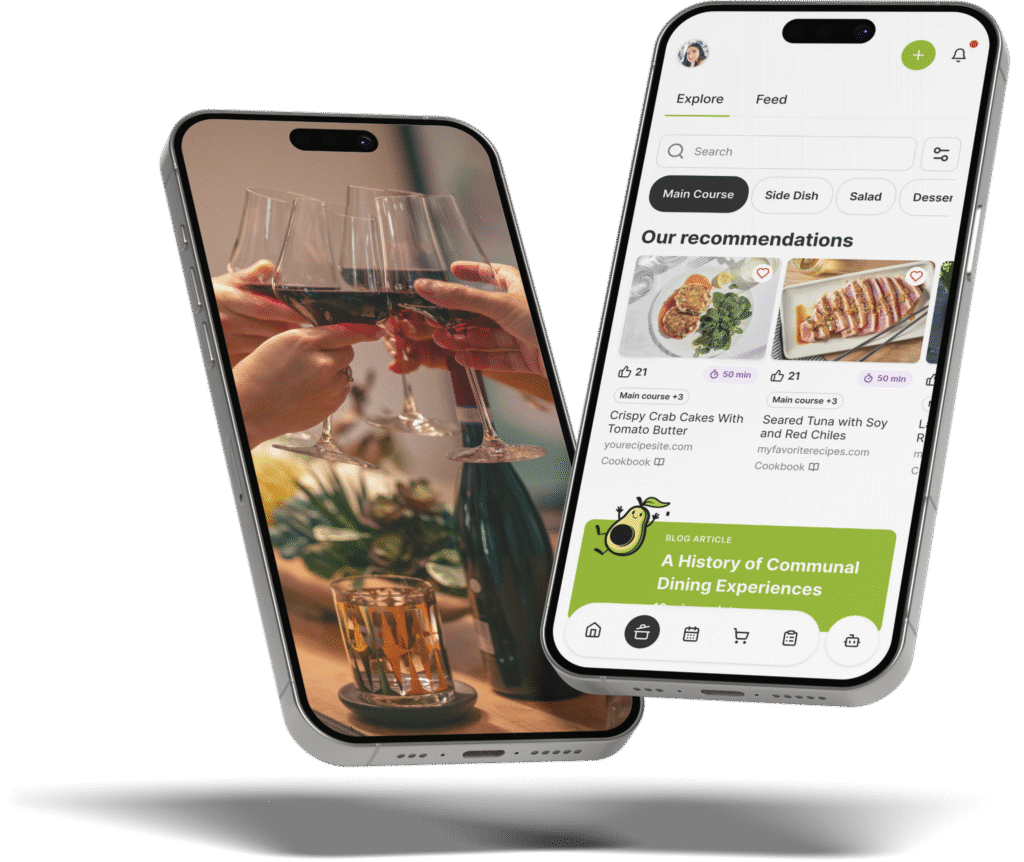
The Gourmet Host mobile app lets you create your event, add a custom theme, and build your menu for all guests to see. When guests RSVP, their food preferences and allergies are logged automatically. The app keeps these notes with the event so you can check recipes and ingredient labels, acting as a digital organizer for your preparation.
For co hosted events like a bachelorette party or family shower, you can easily invite co hosts, assign dishes, and use the cost splitter to simplify post party logistics. This means you can focus entirely on reliving the fun rather than calculating who bought the champagne and who bought the appetizers. Share recipes, grocery lists, and tasks with co-hosts before the event.
Start with 500 plus recipes from professional test kitchens, then search recipes from across the web and jump straight to the original source without leaving the app. You can plan a cohesive menu that satisfies every guest around your dining table.
Create an interactive event page in The Gourmet Host to track RSVPs, assign co host duties, and review guest dietary notes against your chosen recipes. You can download the app at thegourmethost.com to start planning your next intimate celebration.
Frequently Asked Questions
Are digital invitations OK for a wedding?
Yes, digital invitations are entirely appropriate for intimate weddings, rehearsal dinners, and showers hosted at home. They provide immediate delivery and give you a centralized dashboard to track RSVPs and dietary restrictions in real time. This format works exceptionally well for gatherings of under twenty people where extensive paper suites feel unnecessarily formal.
How do you make digital wedding invitations for free?
You can use event management platforms to build customized event pages without paying for postage or premium paper stocks. Many apps offer built in templates that allow you to add your specific menu, collect RSVPs, and feature a direct registry link. You can view Bridal Shower Planning: Venues, Timing, Hosting for practical guidance on planning the celebration.
Can I use an RSVP app for a small wedding at home?
An RSVP app operates perfectly for a small wedding at home by consolidating your guest list and menu into one platform. These tools allow you to log food preferences automatically and assign dishes if friends offer to bring side items. This organization keeps your grocery lists accurate and prevents kitchen confusion on the big day.
When do you send digital wedding invites for a micro wedding?
You should send the formal digital link approximately four to six weeks before a home based micro wedding. This gives your guests ample time to secure time off work and arrange localized travel. Sending them too early for a small event often results in guests forgetting to RSVP until the very last minute.
How do online save the date invitations differ from graduation online invitations?
Online save the date invitations focus entirely on reserving the calendar block without providing the full menu or specific start times. Graduation online invitations typically contain all the immediate event details, including open house hours and parking directions. You can view 7 Digital Graduation Invitations Tips for Home Hosts to see how casual event formats handle immediate details differently.
How do you address digital invitations for a wedding shower?
You should address digital wedding shower invitations directly to the individual guest or couple using the platform’s personalized naming features. Modern email platforms allow you to input the exact name of the invitee, preventing confusion about whether children or plus ones are included. Clear addressing guarantees your home dining table has the exact number of chairs required.
Continue Reading:
More On Digital Invitations and RSVPs
- 7 Canva Digital Invitations for Better Dinner Parties
- 7 Tips for Birthday Digital Invitations That Wow Guests
- 7 Digital Invitations Birthday Tips for Easy Hosting
- 5 Save Date Online Invitations Tips for Easy Hosting
- 7 Digital Graduation Invitations Tips for Home Hosts
More from The Gourmet Host
- Bridal Shower Planning: Venues, Timing, Hosting
- Bridal Shower Brunch: Menu, Timing, Drinks, Setup
- Engagement Party Planning: A Complete Host Guide
- Engagement Party Etiquette: What Every Host Knows
- Family-Style Dinner Wedding Guide: Best Meal Ideas
Explore TGH Categories