7 AnyList App Tips for Flawless Dinner Parties
 12 min read
Planning your menu with an anylist app gives you complete control over your ingredients when hosting four to twelve friends for dinner. Digital grocery management transforms your kitchen preparations into a simple, predictable routine. You can track exactly what you need without making multiple trips to the supermarket.
This guide shows you how to structure your shopping trips and prepare your pantry for incoming guests. You will discover practical ways to handle your beverage purchases and organize your serving schedule. Implementing these exact steps ensures your kitchen runs smoothly while you focus entirely on connecting with your friends.
At a Glance
- Categorize your digital checklists by store aisle to drastically reduce your total shopping time.
- Buy fresh produce two to three days before your guests arrive to guarantee optimal flavor.
- Keep long lasting items stocked for immediate appetizer options when friends arrive early.
- Serve red wine slightly below room temperature to bring out the best tasting notes.
- Check your refrigerator against your mobile inventory to prevent duplicate ingredient purchases.
What an anylist app means for your dinner party
An anylist app functions as a digital inventory tool that manages your exact grocery needs for social gatherings. Home hosts use this software to group recipe ingredients, track pantry staples, and share shopping duties with cohosts. This modern tool replaces scattered sticky notes with an organized checklist you carry right on your smartphone.
You apply this technology when coordinating multi course meals that require ingredients from different specialty stores. The difference between a static digital notepad and a dedicated grocery application is the automated store department sorting.
Using a meal management application allows you to update your needs in real time as your menu evolves. You avoid duplicate purchases and ensure your kitchen is fully stocked long before the doorbell rings.
How do you create an efficient dinner party grocery list?
Organize your grocery list by aisle and recipe to avoid multiple trips to the store. Using a centralized list simplifies meal preparation and allows cohosts to easily see what items remain. Love and Lemons’ meal planning model uses a single shared grocery list to minimize food waste.
For a broader feature comparison, read The Gourmet Host vs AnyList: Grocery Lists That Go Further.
A well structured grocery inventory software prevents you from walking back and forth across the supermarket. You save energy and time when your items flow in the exact order of the store layout.
This works because you bypass the crowded center aisles entirely.
Your shopping trips become highly predictable and highly efficient.
Many hosts prefer to integrate a 7 Shopping List Template Tips for Easy Dinner Parties approach to speed up the data entry process. You simply duplicate a master template for your favorite menu and adjust the quantities based on your guest count.
Baking fresh artisan loaves for your guests requires specific dry ingredients you must catalog properly. King Arthur Unbleached Bread Flour has a protein content of 12.7 percent, which is a full percentage point higher than standard national flour brands.
Adding specialty items like this to a dedicated baking category ensures you grab the correct bag on your first try.
When substituting bread flour for all purpose flour in bread recipes, bakers should add roughly 2 teaspoons of extra water per cup of flour to achieve proper dough hydration. Your digital notes section is the perfect place to record these conversion ratios.
Group your ingredients into clear categories like produce, dairy, and pantry before heading to the store to cut down your shopping time.
|
Connect the Menu and the Gathering |
When should you schedule your grocery shopping before a party?
You should schedule your grocery shopping two to three days before the gathering to ensure peak freshness for produce. The Emily Post Institute recommends creating a detailed party prep timeline by starting from the event date and working backward to schedule your menu shopping.
Coordinate contributions with The Best Potluck Apps to Organize Who Brings What.
Purchasing your items early leaves ample time to wash and chop ingredients before your friends arrive.
This window gives you enough flexibility to visit a second store if your primary market is out of fresh basil.
In traditional Japanese home cooking, jobisai refers to staple make ahead side dishes kept on hand to streamline daily meal preparation. You can adopt this exact mindset for your gathering by knocking out dressings and marinades on your shopping day.
Creating a specific timeline for your tasks keeps your kitchen organized and your mind focused.
You might even use 7 Google Shopping List Hacks for Dinner Party Hosts to share the pickup schedule with a partner.
Early shopping guarantees your herbs remain vibrant and your root vegetables stay crisp in the crisper drawer. You wake up on the morning of your event with a fully stocked kitchen and zero errands to run.
Add calendar reminders for your shopping trip and separate highly perishable items from shelf stable goods on your digital list.
What pantry staples should you keep on your shopping list?
Your shopping list should always include versatile, shelf stable items that easily transform into appetizers if guests arrive early. Maintaining a pre stocked pantry with staples like tapenades, cured meats, nuts, and sparkling water enables hosts to entertain guests on short notice.
Build your menu around guest needs using How to Host a Mixed-Diet Dinner Party Confidently.
Keeping a dedicated inventory of non perishable goods means you are never caught off guard.
You can assemble a beautiful charcuterie board in minutes just by pulling items from your cupboards.
Your application should include a permanent section dedicated exclusively to these long lasting ingredients. Whenever you use the last jar of olives, you instantly tap the item on your screen to restock it during your next market run.
Stocking up on mixed nuts, quality crackers, and imported cheeses gives your friends something delicious to nibble on while you finish cooking. A reliable pantry eliminates the panic of hungry arrivals.
Here is a breakdown of specific shelf stable items to keep on your recurring digital list:
| Specific Pantry Item | Minimum Storage Time | Immediate Serving Method |
|---|---|---|
| Marcona almonds in olive oil | Six months unopened in cool pantry | Serve directly in small ceramic ramekins |
| Kalamata olives with brine | Twelve months sealed in glass jars | Drain liquid and mix with lemon zest |
| Artisan sourdough flatbread crackers | Eight months stored in airtight packaging | Arrange in an overlapping circular pattern |
| Flavored botanical sparkling water | Nine months maintained at room temperature | Pour over ice with fresh citrus |
Set up a recurring checklist in your app for pantry staples so your home bar and snack cabinet are always ready for impromptu toasts.
|
Hosting Tip: keep serving supplies on the list. |
How much wine should you add to your shopping list?
You should plan for one standard bottle of wine per two guests for a typical dinner, but adjust quantities for tasting events. A standard tasting pour is between two and three ounces, meaning a single 750ml bottle yields approximately 10 tasting servings.
Review your equipment before shopping with Kitchen Essentials Every Home Host Should Stock.
Entering the correct quantities into your digital inventory prevents you from running dry midway through the main course.
You always want to have a slight surplus of beverages to keep the conversation flowing naturally.
Purchasing wine in advance gives the bottles time to rest and settle after transportation. This is especially true for older vintages that might have sediment that needs to drop to the bottom of the glass.
Your shopping tracking tool makes it simple to monitor the specific varietals you plan to pair with each course.
You can leave notes directly on the grocery entry to remind yourself which bottle goes with the seafood appetizer.
Offering sparkling cider or craft sodas alongside your wine ensures every single attendee has a fun beverage in hand. Documenting these alternatives on your list guarantees nobody is forgotten.
Calculate your total alcohol needs before creating your list, ensuring you also include non alcoholic alternatives and ingredients for a welcome drink.
How should you serve the wine you just purchased?
You should serve your purchased wines at their optimal temperatures to enhance the dining experience. Wine Folly advises serving red wines slightly below room temperature, between 62°F and 68°F, rather than pulling them directly from a warm grocery bag.
Reduce last-minute cooking with ideas from Easy Cold Appetizers That Need Zero Cooking (Full Guide).
Proper temperature management allows the nuanced flavors of your carefully selected bottles to shine.
Serving a red wine too warm makes the alcohol taste sharp and overpowering to the palate.
Adding a chilling schedule to your event timeline prevents you from scrambling when it is time to pour. You can organize these small tasks right alongside your grocery items in your digital application.
White wines and sparkling varieties require significantly more time in the refrigerator to reach their crisp peak.
Storing them in the fridge the night before your gathering takes one more task off your plate entirely.
A well prepared beverage station allows your friends to easily top off their own glasses. You create a relaxed environment where everyone feels completely at home.
Place your red wine in the refrigerator for 15 to 20 minutes before guests arrive to bring it down to the ideal serving temperature.
How can a digital shopping list help reduce food waste?
A digital shopping list prevents over purchasing by giving you an exact inventory of what you need for your planned menu. Over 50 percent of all food produced in Canada is lost or wasted across the food supply chain, highlighting the need for precise grocery planning.
Strategic menu mapping ensures every single item you buy has a specific purpose for your gathering.
A 2017 University of Paris study of 40,000 participants found that individuals who planned their meals were less likely to be obese and ate a wider variety of foods.
Buying exactly what you need protects your grocery budget and keeps your refrigerator highly organized. You avoid the guilt of throwing away wilted greens that you purchased without a concrete plan.
Many digital tools allow you to scale recipe portions up or down based on your final headcount.
This precise calculation means you purchase the exact weight of protein required for the main course.
When you stick to a clear plan, your kitchen operations become highly efficient. You utilize every ingredient you bring home, turning small leftovers into a simple lunch the following day.
Review your digital list against your fridge inventory before shopping to cross off ingredients you already own.
|
Let Guests Claim Their Contribution |
How The Gourmet Host Helps You Upgrade Your AnyList App Workflow
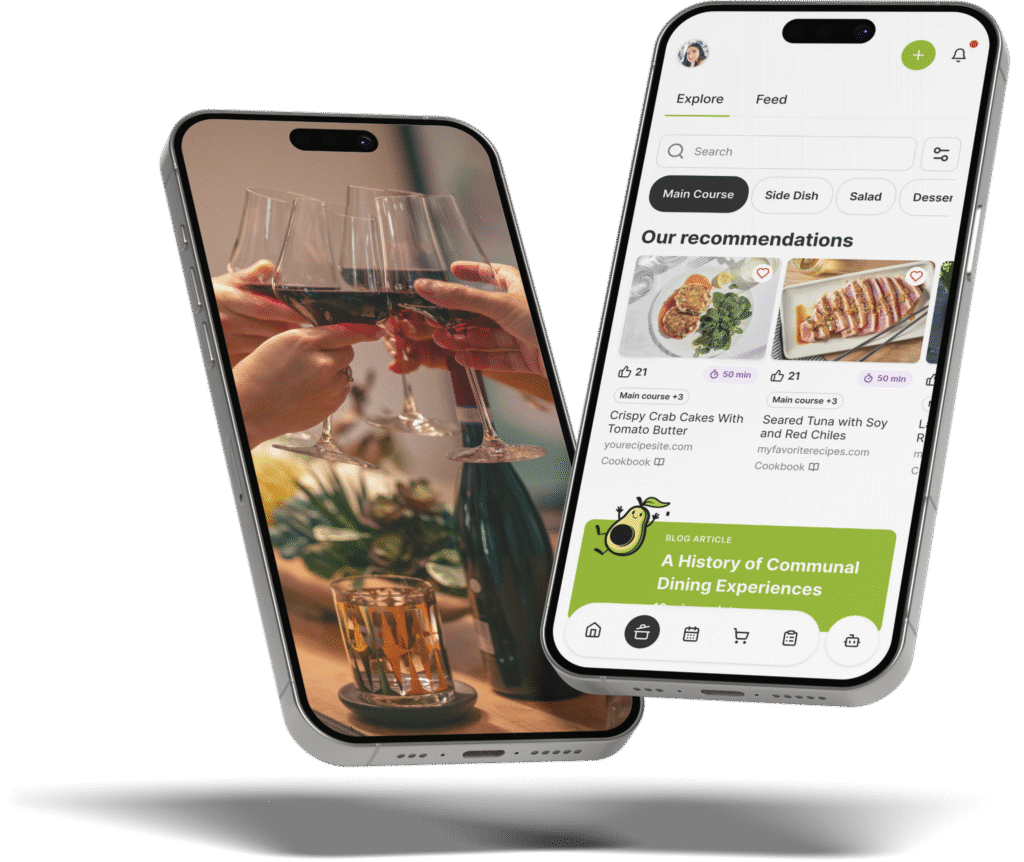
While standard grocery applications help you buy ingredients, The Gourmet Host mobile app manages the entire gathering. It acts as a digital organizer, keeping guest dietary notes with your menu so you can check ingredients and choose suitable replacements. You can sync saved recipes into a combined shopping list.
Beyond the food, the platform lets you invite cohosts, assign dishes, and split costs. This turns meal preparation into a truly collaborative experience for everyone involved in the gathering.
Rather than juggling separate software for invites, recipes, and shopping, you can manage the entire social and culinary experience in one single app.
Consolidating your tools means you spend less time tapping your screen and more time interacting with your attendees.
The platform provides shared recipes, task lists, and potluck sign-ups to coordinate contributions before the gathering. You maintain the collaborative spirit of the evening by sharing the preparation with your guests.
Shared recipe and task lists make it easy to organize your preparation directly from your kitchen counter. You get to focus entirely on experimenting with new flavors and sharing incredible food with the people you care about.
Create an interactive event page on The Gourmet Host to share your menu, track dietary needs, and easily split the grocery bill with your friends.
Frequently Asked Questions
Is AnyList a free app?
AnyList offers a free basic version that allows users to create text based grocery lists and share them with household members. The application also provides a premium subscription tier that unlocks advanced features like unlimited recipe web importing, meal planning calendars, and recipe scaling.
How do you share a digital grocery list with a cohost?
You can share a digital grocery list by opening the application settings and entering your cohost’s email address. The software instantly sends an invitation link to their device, allowing both of you to view, add, and check off ingredients in real time while shopping at different stores.
Can you import recipes from websites into grocery apps?
Yes, many modern grocery applications feature an automated import tool that extracts ingredients and instructions directly from food blogs. You simply paste the recipe URL into the software, and it automatically categorizes the required ingredients into your master shopping list for easy purchasing.
What is the best way to split grocery costs for a dinner party?
The best way to divide grocery expenses is to use a dedicated social hosting application that tracks shared spending and shows each person’s balance. This approach removes the awkwardness of asking friends for money and ensures the financial contribution remains completely transparent for all attendees.
How do you track RSVPs and dietary restrictions together?
You track attendance and food allergies simultaneously by sending digital invitations that include a mandatory dietary questionnaire. When your friends confirm their attendance, their specific food preferences flow directly into your event dashboard, allowing you to select appropriate recipes before generating your grocery list.
Can I use a shopping list template for my dinner party?
You can definitely use a preformatted shopping template to quickly organize your required ingredients by store department. Reusing a master checklist for your favorite menu saves significant planning time and guarantees you never forget essential pantry items or beverage mixers during your market run.
Continue Reading:
More On Grocery List Apps
- 7 Shopping List Template Tips for Easy Dinner Parties
- 7 Google Shopping List Hacks for Dinner Party Hosts
- 7 Ways a Shopping List Meal Planner App Simplifies Hosting
- 7 Meal Planner App With Shopping List Tips For Hosts
- 7 AnyList Web Tips to Plan Better Dinner Parties
More from The Gourmet Host
- The Gourmet Host vs AnyList: Grocery Lists That Go Further
- The Best Potluck Apps to Organize Who Brings What
- How to Host a Mixed-Diet Dinner Party Confidently
- Kitchen Essentials Every Home Host Should Stock
- Easy Cold Appetizers That Need Zero Cooking (Full Guide)
Explore TGH Categories