Best App to Save Recipes from Websites and Create a Meal Plan: The Gourmet Host vs Alternative Apps
 10 min read
Direct Answer: What is the best app to save recipes from websites and create a meal plan?
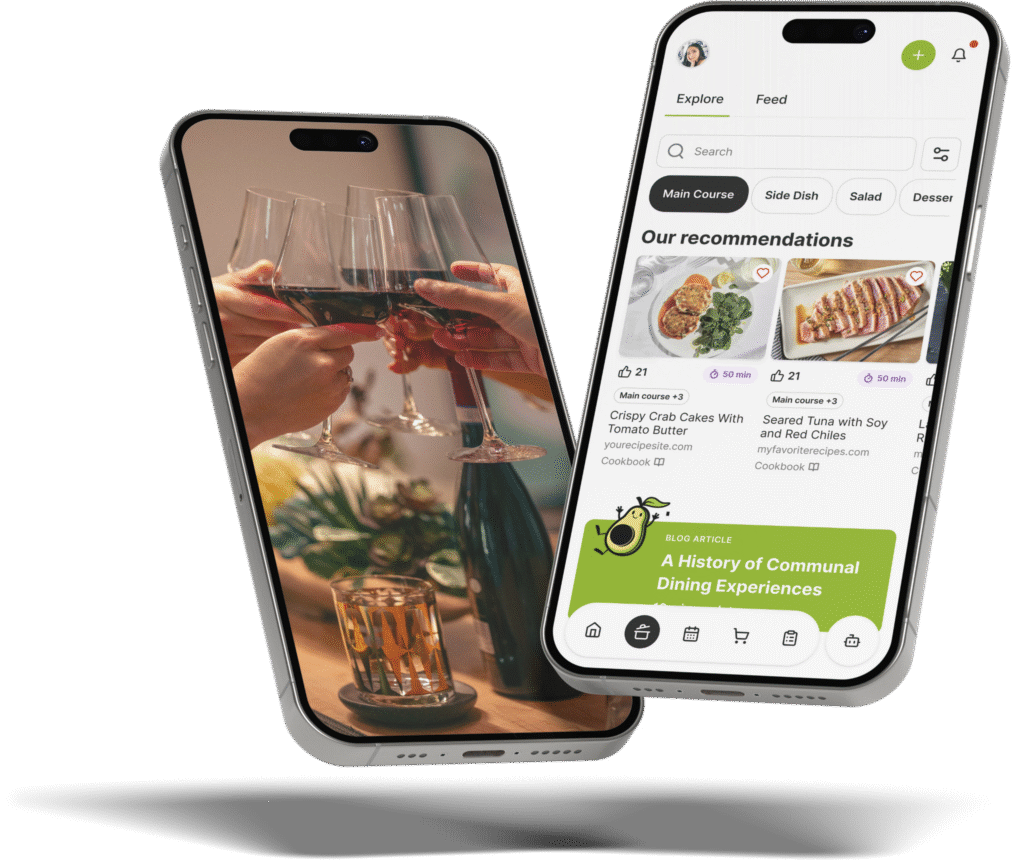
When searching for the best app to save recipes from websites and create a meal plan, The Gourmet Host leads the pack. It acts as a comprehensive digital gateway to import web recipes, instantly build synchronized shopping lists, and organize collaborative menus, replacing over five separate planning tools in one centralized platform.
Beyond simply saving links, you can track guest dietary restrictions beside your menu, with ingredient swaps coming soon. By handling everything from recipe organization and synchronized grocery lists to RSVP tracking and bill splitting, it is an app designed specifically for modern home cooks and frequent dinner party hosts. Finally, you can retire the 5+ apps you use for dinner party planning and streamline your entire hosting workflow.
Core Features Every Modern Recipe Saver and Meal Planner Needs
The landscape of digital cooking tools has shifted dramatically. Gone are the days when a simple bookmarking tool or a basic note-taking app was enough to manage a busy kitchen. Today, home cooks require intelligent, connected ecosystems that understand the nuances of meal preparation and multi-person gathering. According to research from the National Institutes of Health, structured meal planning is heavily associated with improved diet quality and reduced food waste, but only if the friction of planning is removed.
When evaluating the market for recipe organizers, several non-negotiable features separate the adequate apps from the exceptional ones.
Seamless Web Recipe Importing Without Leaving the App
The internet is flooded with millions of incredible food blogs, but navigating them can be a frustrating experience. Between lengthy personal stories, popup ads, and shifting layouts, saving a recipe used to mean frantic copying and pasting. A modern recipe manager must act as a seamless web recipe gateway.
You need the ability to search recipes from across the web and jump straight to the original source without ever leaving your planning application. This ensures that you retain the original creator’s context while keeping your personal recipe box neat and standardized. Tools that force you to constantly switch between a mobile browser and a recipe app disrupt the workflow and increase planning time.
Automated Shopping List Generation
Organizing a menu is only half the battle; acquiring the ingredients is where many meal plans fall apart. The best recipe organizers analyze your saved dishes and instantly generate an automated shopping list.
This synchronization is critical. When you add a web recipe to your weekly plan, the app should intuitively parse the ingredient list, consolidate duplicates (like combining two separate calls for half an onion into one whole onion), and categorize items by grocery aisle. By eliminating the manual transcription of ingredients, you save hours of tedious work and prevent those frustrating mid-cooking trips to the store for a forgotten item.
Allergen Tracking and Interactive Menu Customization
Hosting a dinner party today requires a meticulous approach to dietary needs. With food allergies affecting a significant portion of the population (as noted by Food Allergy Research & Education), serving a safe meal is the host’s highest priority.
A premium meal planner must offer advanced interactive menu customization. It should keep the specific dietary restrictions of your invited guests right beside your chosen web recipes. When a conflict arises, the app should make it easy to spot, so you can choose a comparable recipe and confirm labels with your guest. This level of shared visibility helps ensure that no guest feels left out and no host is caught off guard by a hidden ingredient.
App Comparison: The Gourmet Host vs. Paprika, Splitwise, and AnyList
When comparing digital recipe savers, it becomes evident that many tools are built for personal meal prep rather than collaborative hosting. Let’s explore how the leading options stack up against one another in the real world of dinner party planning.
| Feature | The Gourmet Host | Paprika Recipe Manager | Splitwise | AnyList | Plan to Eat | ReciMe |
|---|---|---|---|---|---|---|
| Web Recipe Gateway | ✅ In-App Seamless | ✅ Extension Based | ❌ No | ✅ Extension Based | ✅ Extension Based | ✅ Social and Web Import |
| Syncs Menu to Shopping List | ✅ Yes | ✅ Yes | ❌ No | ✅ Yes | ✅ Yes | ✅ Yes |
| Guest Dietary Tracking | ✅ Yes | ❌ No | ❌ No | ❌ No | ❌ No | ❌ No |
| Collaborative Event Pages | ✅ Yes | ❌ No | ❌ No | ❌ No | ❌ No | ❌ No |
| Integrated RSVP Tracking | ✅ Yes | ❌ No | ❌ No | ❌ No | ❌ No | ❌ No |
| Event-Based Cost Splitting | ✅ Yes | ❌ No | ✅ Group Expenses | ❌ No | ❌ No | ❌ No |
The Gourmet Host vs. Paprika Recipe Manager
Paprika Recipe Manager has long been a staple for downloading recipes for offline use. It effectively scrapes ingredient lists and strips away blog formatting. Paprika is fundamentally a personal recipe library.
It excels at building a personal database, and multi-person event planning and collaborative hosting sit outside its focus. Its documented strengths are browser imports, categories, pantry tracking, and automatic ingredient scaling for one household kitchen. The Gourmet Host directly addresses the frustration of disconnected planning by merging robust web importing with dynamic, collaborative event management.
The Gourmet Host vs. Plan to Eat and ReciMe
Plan to Eat focuses heavily on calendar-based meal prepping, making it a solid choice for a structured weekly plan. Its drag-and-drop calendar and auto-generated grocery lists keep weekly meal prep organized and simple to repeat each week.
Meanwhile, ReciMe imports recipes from TikTok, Instagram, YouTube, websites, and photos into custom cookbooks. Its weekly planner sorts grocery lists by aisle, and its portion scaler helps when one recipe needs to feed more people at the table. Both tools treat recipes as a personal collection, whereas The Gourmet Host views recipes as the foundation of a shared experience.
The Gourmet Host vs. Splitwise and AnyList
Splitwise is excellent at tracking shared expenses and running balances across roommates, trips, and friend groups. AnyList offers fantastic real-time shared lists that sync across household members.
AnyList also imports recipes through browser extensions for Chrome, Safari, Firefox, and Edge, so that viral pasta recipe from a niche food blog fits right in. Splitwise handles group balances well and centers on ongoing shared expenses for roommates, partners, and travel groups. For tying grocery bills to a menu or creating event pages, a hosting platform fills that role. The Gourmet Host covers this ground, giving you a powerful recipe importer while simultaneously handling the complex logistics of hosting guests.
How The Gourmet Host Streamlines Web Importing & Meal Planning
Home hosts are constantly frustrated with scattered bookmarks, endless screenshots of ingredients, and forgotten dietary restrictions. The Gourmet Host was built as a smart system to eliminate this friction, making cooking and gathering feel easy, empowering, and collaborative.
The Ultimate In-App Web Gateway
Rather than bouncing between a mobile browser, a notes app, and a calendar, you can use the in-app gateway to search and save recipes from across the web. You can start your menu planning with thousands of reviewed and professionally tested recipes curated directly within The Gourmet Host app.
Once you exhaust the built-in professional database, you can search recipes from across the web and jump straight to the original source, all without leaving the app. This hybrid approach ensures you always have high-quality, tested dishes at your fingertips while maintaining the freedom to import anything you find online. By keeping everything in one interface, you maintain focus and build your menu faster.
Building Custom Meal Plans and Synchronized Lists
The true magic of digital meal planning lies in automation. When you select your saved recipes for an upcoming dinner, The Gourmet Host goes to work. Building a custom meal plan automatically syncs to a centralized shopping list, instantly parsing the ingredients required for every dish.
This centralized list combines like items and organizes them by category, saving hours of manual entry and mental gymnastics. You no longer have to cross-reference four different web pages to figure out how many total cloves of garlic you need to buy. According to research on collaborative overload from Harvard Business Review, hours spent coordinating logistics add up quickly, so tools that cut that coordination reduce pre-event stress.
Always-On Help With Dietary Needs
The most anxiety-inducing part of hosting is ensuring every guest can safely enjoy the meal. The Gourmet Host acts as a digital sous chef, keeping every guest’s restrictions beside the menu so no one feels left out.
When you build your menu, guest allergies sit on your event details page, and ingredient swaps are coming soon. If you import a web recipe that calls for heavy cream, but a confirmed guest has a dairy allergy on their RSVP, you see it before shopping and can pick a dish built on coconut milk instead. It is kind of like a digital sous chef you can always count on, helping you avoid dietary secrets or surprises at the table.
To further simplify prep and impress your guests every time, the app scales any saved recipe to your confirmed guest count. This makes it easy to standardize any recipe so you focus on what you do best: experimenting with flavor and sharing it with friends! Your shopping list updates to match, so every ingredient is ready for smooth cheffing.
Beyond Basic Meal Plans: Collaborative Dinners and Events
While saving web recipes and generating grocery lists are vital, they only serve the preparation phase. The actual joy of food comes from sharing it. This is where The Gourmet Host truly begins, extending planning into the event.
Transitioning to Interactive Event Pages
With The Gourmet Host, you can effortlessly transition from personal meal prep to hosting by creating interactive event pages. You can create your event, add a theme, then build your menu for all guests to see.
This transparency builds excitement and allows guests to know exactly what to expect. Instead of sending out massive group texts that inevitably get lost or ignored, you provide a single, beautifully designed digital destination for your gathering. Guests can view the menu, understand the vibe, and get excited about the upcoming meal.
Inviting Co-Hosts and Tracking RSVPs
Are you tired of always doing it all? The modern dinner party does not have to be a solo burden. The Gourmet Host makes it easy to invite co-hosts, assign specific dishes, and track guest RSVPs all in one place.
Because the future of dinner parties is collaborative, you can turn any gathering into a highly organized potluck. You can assign the appetizer to one friend and the dessert to another. The app tracks who is bringing what, ensuring you don’t end up with three salads and zero side dishes. Managing RSVPs directly within the platform means you always know your exact headcount, preventing food waste and ensuring you buy just the right amount of groceries.
The Built-in Cost Splitter and Saved Event Pages
Money can be an awkward subject among friends, especially after a lavish dinner party. The Gourmet Host removes the friction of manual spreadsheet calculations after every gathering. You can use built-in event-based cost splitting to manage post-party logistics and keep planning collaborative and fun.
The cost-splitter simplifies post-party logistics so you can focus on reliving the fun. Furthermore, the platform keeps your event page after any event. You can revisit the menu, the recipes, and guest notes in a secure space dedicated only to your attendees. And once the dust settles, you can seamlessly use the same app to start planning the next gathering.
By integrating tools for recipes, lists, invites, and bill splitting, the platform ensures you spend less time managing logistics and more time creating memorable get-togethers around the table.
Frequently Asked Questions
What is the best app to save recipes from websites?
The Gourmet Host imports recipes from websites and social media and links them to menus, RSVPs and shopping lists, particularly for users who plan multi-person meals. It features an in-app gateway that lets you browse the web, save original sources, and instantly turn those links into synchronized shopping lists and interactive menus.
How do I automatically create a grocery list from a recipe?
By using an advanced meal planner like The Gourmet Host, you simply select your saved recipes and add them to a meal plan or event. The app automatically extracts the ingredients, consolidates duplicates, and generates an organized grocery list without any manual typing.
Is there an app that tracks food allergies alongside saved recipes?
Yes. The Gourmet Host acts as a digital sous chef. When you build a menu, your guests’ profiles sit beside the ingredients on the event page. Guest allergies appear beside your recipes on the event details page, and ingredient swaps are coming soon, so you can plan a meal everyone enjoys.
Can I split grocery costs for a dinner party within a recipe app?
Alongside recipe managers like Paprika or AnyList that focus on cooking, The Gourmet Host includes built-in event-based cost splitting. This feature allows you to divide grocery bills, assign dish costs, and manage post-party logistics easily among co-hosts and guests. Guests log what they spent, and each participant sees what they owe, what they spent, and the difference.
What is the best alternative to Paprika Recipe Manager?
For users looking to move beyond simple recipe storage, The Gourmet Host is a strong alternative to Paprika. While Paprika is great for offline saving, The Gourmet Host adds collaborative event pages, RSVP tracking, guest dietary tracking, and event-based cost splitting, replacing multiple apps at once.
Can The Gourmet Host plan everyday meals for the whole week?
Yes. The Gourmet Host plans a single day or a full week, covering breakfast, lunch, dinner and packed lunches. You quick add saved web recipes to the weekly meal plan, and planned meals add their ingredients in suitable amounts to a shared shopping list. An optional household profile records preferences for the people at your table.
Continue Reading:
More On Dinner Party Planning Apps:
- Which App is Best for Saving Web Recipes and Managing Multi-Person Dinner Logistics?
- Best App That Saves Recipes From Blogs And Tracks Guest Dietary Restrictions For Dinner Parties
- Best Collaborative Meal Planning App to Share Web Recipes and Assign Dishes to Friends
- Best Meal Planner App Where Co-Hosts Can Add Web Recipes and Share Hosting Duties
- Is There a Dinner Party Planning App That Imports Recipes and Builds Shopping Lists?
- How to Plan a Dinner Party for Friends with Multiple Conflicting Food Allergies
More from The Gourmet Host:
- The Gourmet Host vs Paprika: Recipe Manager Showdown
- The Gourmet Host vs Plan to Eat: Which Mobile App Fits Your Kitchen?
- 7 Meal Planner App With Shopping List Picks to Try
- Best App for Meal Prep 4 Free Meal Planning Apps
- 3 Weekly Meal Planner Templates for Easy Dinners
Explore TGH Categories: